BDEducationManager · School management software — All of a school's work, in one software — at one price
From admission to results, fees to SMS — 77 features and 427 sub-features in one software. No feature costs extra.
৳1,000 a month up to 500 students; beyond that, ৳2 a month for every studentSee prices
No login needed — a whole school is set up: students, fees, results, routine, SMS.
- 77 features, 427 sub-features
- Sign up and start today
- Results by the board's rules
- Bangla or English, all of it on a phone
What is BDEducationManager?
BDEducationManager (bdeducationmanager.com) is online school management software for Bangladesh's schools, colleges, madrasas, kindergartens and coaching centres. Admission, attendance, fee collection, exams and results, mark sheets, ID cards, staff salaries, school vehicles and SMS to guardians — an institution's daily work in one place, in a browser, on a computer or a phone. Every paper in Bangla or English.
77 features and 427 sub-features, all at one price: ৳1,000 a month up to 500 students; beyond that, ৳2 a month for every student. You sign up by yourself and start the same day; it runs in Bangla or English. Before buying, open the demo with no login and see for yourself.
At a glance — what it has
- Student admission and recordsAdmission, adding old students, ID and roll, the admission form with the photo, the whole profile, year-end promotion
- Discipline recordWho did what and when, and what was done; the guardian told by SMS if wished
- Fee management — every kind of feeAdmission fee, monthly fee, exam fee, any fee under your own name; receipts, dues, discounts, late fees
- Attendance — digital and automatedIn a click on a phone or computer; by itself from an RFID card machine (new); an SMS to the guardian on arrival; on a screen at the gate with the photo
- Vehicles and routesA price by route, class or km; a discount agreed at admission; a bill each month; a month off and on again; the drivers' cost
- ResidencesYour own heads and prices; a residence from admission, billed each month; advisors, the night's roll, the going-out book and SMS to guardians
- Exams and resultsEnter marks; GPA, pass or fail and merit follow — by the board's rules
- Groups and subject choice — SSC, HSCScience, Humanities, Business Studies; each student's compulsory and optional (4th) subjects, counted against the total; results and admit cards by their own subjects
- Mark sheets and transcriptsA whole section's mark sheets at once; every exam's result on one page
- Question papersCreative, multiple choice, short; the marks added up as you write; printed on A4 under your name
- Teacher monitoringWho took which class and what was taught; daily and monthly reports, the head's comment; a teacher replaced keeps their part
- Class routinePeriods laid out, a class swapped for a day, printed three ways
- Staff and payrollRecords, leave, the month's salaries, salary slips
- Accounts — income and expenseExpense vouchers; income and expense histories — who, under which head, how much; the transactions of any dates; income and spending in charts
- SMSTo all or a few; results, automatic dues reminders, SMS for the absent and on arrival; by vehicle
- ID cards, admit cards, certificatesID cards in fourteen designs, lanyard designs; TC, attestation, testimonial
- Notice boardNotices printed on your letterhead, sent as SMS in a click
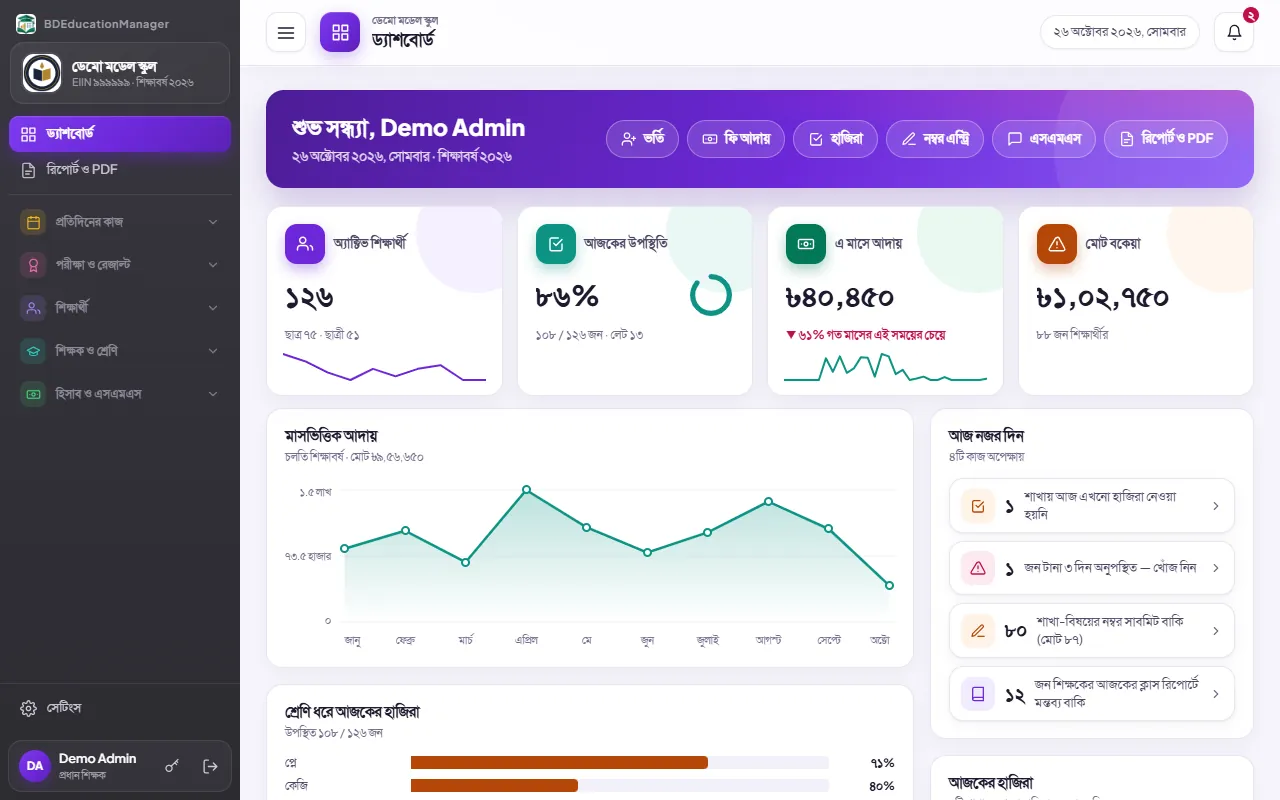
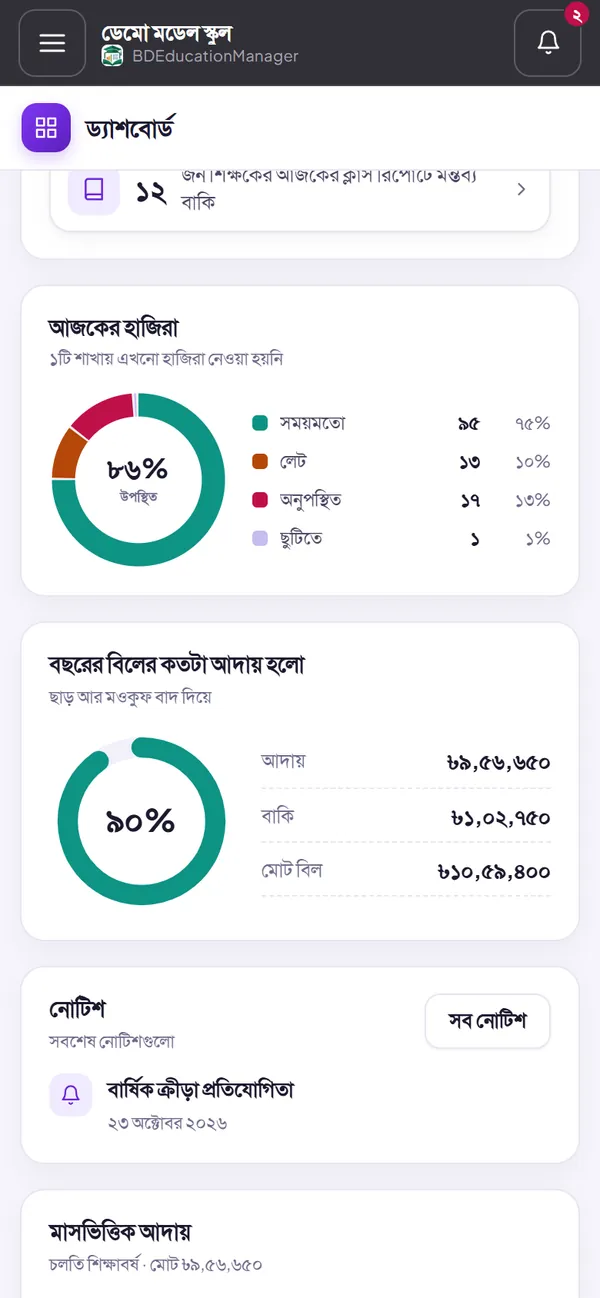
- Reports and dashboard43 kinds of reports and prints; collections, dues and results in charts
- Roles, permissions and activity logYou decide who may do what; who changed what is all recorded
- Several campusesEvery campus in one account
- Excel in and outOld lists in at once; lists, receipts and reports out
- Bangla and English, on a phone tooAll of it in a browser — nothing to install
- Shifts — morning and dayEach shift's name and times; late and early by the shift; teachers in one shift or several; the shift on the ID card
- The school's own websiteOn its own domain, its logo in the tab; a shortcut on an Android phone from a QR code; notices, teachers, routine, holidays and admission come from the software
- Student and guardian panelIn with the student's ID; results, dues, payments, attendance, the routine, admit cards, the day's lessons and certificates
- Backup and safetyA backup every night; only yours brought back if deleted by mistake; each institution's data kept apart
All in one software
An institution's main work — in one place, with one login
No more separate registers, spreadsheets and receipt books — enter a thing once and it is everywhere it is needed.
- 77features
- 427sub-features
- 43kinds of reports and prints
- 8kinds of institution, set up ready
- 14ID card designs
- 2languages — Bangla and English
All of it, one price
Others sell features in pieces. We give you all of them at one price.
We compared the websites of 10 school software products in Bangladesh. Many split their plans — more features in the dearer plan, some modules priced apart, a big set-up charge. Here there is one plan: everything there is, at this price — the only other cost is the SMS you send.
- Admissions and full student records
- Monthly fee bills, made by themselves
- Receipts, dues, discounts and late fees
- Results, merit places and mark sheets
- Staff salaries and leave
- Income, expenses and vouchers
- Class routine and class updates
- SMS, and automatic dues reminders
- Attendance — by hand, or from a card machine
- School vehicles, routes and transport fees
- Residences, advisors and the night's roll
- Every paper in Bangla or English
- Notice board, ID cards and certificates
- Access by role
- A log of who changed what
- Several campuses, Excel in and out
However many teachers and users — the same price.
October 2026: what the websites of 10 school software products in Bangladesh list, counted on one list of 98 features; where a page is unclear, counted in their favour. Ours from the software itself — these 77 features hold 427 sub-features, all of them below.
Pricing
School software pricing — one plan, every feature
Every feature for everyone — the price goes only by the number of students, with no hidden costs. Pay the bill and SMS by bKash or Nagad, from anywhere.
The monthly bill — by the number of students
Small and mid-sized institution
Up to 500 students
৳1,000 / month
A kindergarten, coaching centre, school, madrasa or college — 1 student or 500, the same bill
- Every feature — nothing cut
- Software and server, in one bill
- Any number of teachers and users
Large institution
More than 500 students
৳2 / student / month
Monthly bill = all students × ৳2
- 1,000 students৳2,000
- 1,500 students৳3,000
- 2,000 students৳4,000
- Every feature — nothing cut
- Software and server, in one bill
- Any number of teachers and users
First bill 10 days after you sign up; with 10 days or fewer left in that month, only ৳500 for it; then at the start of each month. As students come and go, the bill follows by itself.
Registration fee (one-time)
৳2,000
Paid once at the start; send it by bKash or Nagad and tell us in the software
SMS
৳0.42 / SMS
Pay only for what you send; no separate SMS account. 160 characters in English or Banglish, 70 in Bangla make one SMS; you see the total cost before sending.
October 2026: of the 10 other products, the 3 whose websites show a price paid month by month — that price for 500 students, with no yearly contract and nothing paid in advance, as ours is. Those sold only by the year, or with no price on their site, are not in this picture. VAT may be extra.
Your school's own website
Your school's website and student panel, on its own domain
Open YourSchoolName.com and there are your school's public pages, the login to this software, and a panel of their own for students and guardians. Filled from the software, all run from our servers. Optional.
YourSchoolName.xyz
Your own address for less
৳400 / year
- The school's public pages
- Student and guardian panel
- Domain, SSL and upkeep — ours
YourSchoolName.com
The better-known ending
৳2,200 / year
- The school's public pages
- Student and guardian panel
- Domain, SSL and upkeep — ours
The school's public pages
- Home, about us, teachers and staff, notice board, class routine, admission, holidays and contact
- Filled from the software — nothing to keep up twice
- The admin, headmaster or principal decides what it shows
Student and guardian panel
- The newly published result — once its transcript fee is paid
- Every earlier result
- What has been paid, and what is due
- Attendance by the month, the routine and admit cards
- What was taught, and the homework
- The school's notices, their vehicle and the driver's mobile
- Their residence, room and advisors
- Certificates to download — once their fee is paid
Nothing to worry about
- Not renewed, the whole software still runs from bdeducationmanager.com; only the public pages and the student panel stop
- Every update reaches everyone — with a domain or without
- The domain, SSL and backups — all run from our servers
Press “See as the demo student” at the student login to open the student panel too — no password needed.
Why us
What you will not find together anywhere else
What a school worries about most — results, money, control and getting started — all four answered in one place.
Results without the trouble
- GPA by the board's rules — 1st and 2nd papers together, 4th-subject points
- A separate pass in CQ, MCQ and practical
- Merit places, mark sheets and guardians' SMS — in a click
Fee collection, kept in order by itself
- Monthly bills made by themselves; part, advance, discounts, late fees
- The dues reminder goes by itself on the days you choose
- A printed receipt — or the cash memo's number without a printer
- Which student paid how much to which head, who was paid how much — by date
Everything in your hands
- Who changed what and when — before and after
- You decide who may see or do what
- Several campuses in one account; a backup every night
Easy to start, little to pay
- Sign up and start today — choose your type and everything is ready
- Your existing lists from Excel at once
- ৳1,000 a month up to 500 students; beyond that, ৳2 a month for every student — every price on this page
At a glance
| Usually elsewhere | BDEducationManager | |
|---|---|---|
| Monthly cost | ৳5–20 a student | ৳1,000 a month up to 500 students; beyond that, ৳2 a month for every student |
| To start | A set-up charge of ৳5,000–10,000 or more | A registration fee of ৳2,000, once |
| Knowing the price | Call and ask | Every price on this page |
| Support | In some, extra “care” plans at ৳15–20 a student | Write from inside the software, call if urgent — no extra fee |
| Getting started | Book a demo, then a few days | Today, by yourself |
| Who changed what | Usually not shown | Every change, before and after |
| Trying it first | A demo the seller shows | Open the demo yourself, now |
New School transport
The school's vehicles — who rides what, what it costs, who owes
Put a student on a vehicle once, and the fee is billed by itself each month. Collection, receipts and dues come with the tuition. Without vehicles none of this shows; it comes once turned on in Settings. It costs nothing extra.
Vehicles, routes and drivers
- A vehicle is added with its route and driver
- Several vehicles on a route, or one on two
- Each driver's monthly cost by name; a voucher on paying
The price, your way
- By route, by class, or by km in steps
- A discount agreed at admission, in per cent or taka
- A mid-month start and a late fee, as you decide
Month by month, by itself
- The fee billed by itself beside the tuition
- A month off, and on again the next
- Who uses it and who does not: a filter and a PDF
New Residences
Residences, the money and the care: who is where, what it costs, how their studies go
Put a student in a residence once and each head is billed by itself each month. An advisor looks after their own students, and guardians hear by SMS. A school with no residences sees none of this.
Residences, heads and prices
- Your own heads: seat rent, meals, internet, a deposit
- The price by residence or by class, as you decide
- A residence from admission; the fees billed by themselves each month
Advisors and monitoring
- By residence, class or section; several in one place
- Their own students' attendance, results and discipline on one page
- Everyone's study notes on one sheet; SMS to guardians
At night
- The night's roll on a phone, room by room, if you want it
- The going-out book: who, why and when they came back, if you want it
- A guardian told of a night away with one press
Every feature
Every feature of the school management software — at one price
Under each feature is what it does. All of it is in the software today, and none of it costs extra.
- 77features
- 427sub-features
- 9groups
Teachers and classes
11 features · 56 sub-features
Staff records, and a login for each
- Name, role, designation, mobile, joining date and monthly salary
- Date of birth, NID, address and qualifications too
- A temporary password for a new account; their own at first login
- A forgotten password reset in a click
- “Former” when someone leaves — the login closed, the records kept; brought back when needed
- When each person last logged in
Teachers assigned by subject, class and section
- By section: pick the teacher beside each subject — saved as you pick
- By teacher: all of one teacher's classes seen and changed together
- A teacher marks and writes updates only for the subjects assigned to them
- Put a subject in the routine and its teacher comes with it
- They come into the new academic year by themselves
- A teacher replaced mid-year, from a day you give — the one before keeps their class updates and reports
- A teacher given by mistake put right — nothing of it left behind
- A subject's class report — the whole year, or each teacher's part
A day-by-day routine: who teaches when
- Periods laid out: the start, minutes a class, how many, when the break is
- Which days of the week have classes
- Click a cell for a subject; drag to swap; copy into many cells
- A teacher put in two sections in the same period is stopped
- In classes 9 to 12, a class a group in the same period — each with its own teacher and room
- One day's routine set on the other days too
- Each teacher sees their own week on logging in
- In a new year, keep last year's routine or make a new one — your choice
What was taught and the homework, updated from a phone
- “What was taught” and “homework” for each class
- A teacher gets only the classes assigned to them
- The office can write for a teacher — and who wrote it is kept
- A class not held stays empty
Each day: who took which class, with the head's comment
- For any date, each teacher: classes in the routine, updates written
- What was taught and the homework, class by class
- The head writes a comment on each teacher's day
- A teacher sees only their own day
A monthly report for each teacher
- Filtered by month, teacher, section and subject
- A summary: classes taken by teacher, section and subject, and the last date
- The day-by-day detail
- Downloaded to Excel
A class given to another teacher for one day
- One period on one date to another teacher, or another subject
- The period shown empty when there is no class
- Not given to a teacher who is in another class then
- The week's routine stays as it was — the change is for that day alone
- The coming week's changes show on the section's and the teacher's routine
The whole routine on one printed sheet — by day, section or teacher
- By day: every section on one sheet
- By section: the whole week
- By teacher: the whole week
Which subjects still have marks missing
- By section and subject: how many students have marks
- Which section's which subject is not submitted yet
- The head reopens submitted marks when something is wrong
Leave allowed and taken
- Days allowed a year — set for each person
- Leave written down: from, to, days (half days too) and the reason
- Allowed, taken and left, at a glance
Classes, sections and subjects — ready lists, and your own
- The usual classes and subjects in a click — Play to Class 12, madrasa subjects too
- Classes and sections under your own names (B, C or “Science”)
- A class teacher and the seats for each section
- Subjects named in Bangla and English; compulsory, optional or 4th subject
- Three groups in classes 9 to 12 — Science, Humanities, Business Studies — and which groups each subject is for
- The three groups' SSC and HSC subjects ready — with the boards' codes
- In a madrasa, the Dakhil and Alim subjects ready by group too
- One class's subjects copied to another
Exams and results
11 features · 64 sub-features
Your list of exams — weekly to annual, and your own
- Weekly, monthly, class test, term, half-yearly, annual, test exam, model test
- Any other under your own name — in Bangla and English
- Made once, the list runs every year
- Which subjects or papers an exam has — the 1st papers only, or all
- Full marks exam by exam — one on 50, another on 100
- Each exam has its own results, merit and mark sheets
CQ, MCQ and practical marked apart, at your full marks
- Written 100, or CQ 70 + MCQ 30, or with a practical
- Parts under your own names — oral, handwriting, whatever you need
- A pass mark for each part and for the whole
- Full marks as you set them — 100, 50 or anything else
- Change the rules later and earlier exams keep their marks
Teachers enter marks on a phone and see the grade at once
- A teacher sees only the sections and subjects assigned to them
- A subject's mark list holds only those who take it
- The total and grade as each part's marks go in
- Marks above the full marks are stopped
- An “absent” tick on each row — zero and absent are not the same; an absent student is never added or averaged
- The head opens the exams teachers give marks in — several at once; a new year starts with all closed
- A section's marks in a subject printed on A4
Marks lock once submitted — only the head reopens them
- Once submitted, that subject's marks cannot be changed
- Only the head reopens them when needed
- After results are published, that class's marks are locked
- Every change in the activity log — who, when, what it was before
GPA, pass or fail and merit place worked out
- A whole class's GPA, pass or fail and merit in one click
- Each student graded in their own subjects; and in how many they failed
- A draft first — published once checked
- Merit within a section, the whole class or each group — your choice
- Those who passed first, then by total marks; equal totals share a place
- A mistake found: withdraw, correct and publish again
- Published only once every mark is in
- A name opens the marks of that student in every subject — each part too
1st and 2nd papers together, the 4th subject by board rules
- One grade from the 1st and 2nd papers added together
- The 4th subject is the student's own choice — each their own
- 4th subject: the points above 2 are added; GPA never passes 5
- A separate pass in CQ, MCQ and practical
- An F in one compulsory subject makes the GPA 0.00
- Subjects like physical education and career education: marks and grade on the mark sheet, not in the GPA
- Your own grades: where each begins and its points
Question papers — creative, multiple choice, short
- A stem with its four parts and their marks; multiple choice with four options; sections by headings
- The marks added up as it is written
- Printed on A4 under your name; the multiple choice answers on a page apart
- A copy of the last one to begin the next
- A teacher's papers are theirs alone — the headmaster or admin sees all
Mark sheets, and every exam's result on one sheet
- A whole section's mark sheets at once — print or PDF
- Each subject's marks, grade and point; the total, GPA and merit place
- The institution's name, address, EIIN, logo and the head's signature
- In classes 9 to 12, the group and the board's registration number
- Every exam of every year on one page — the result history
- A ‘DRAFT’ watermark if printed before publishing
- Colour or black-and-white print
- Last year's class 10 or 12: its admit cards, certificates and SMS — by picking the year
Results to guardians' phones
- Each student's GPA, grade, total and merit place
- To all, only those who passed, or only those who failed
- To the guardian's number, or the student's own
- Only published results are sent
Admit cards — not given when dues are too high; again for a fee if lost
- A whole section's admit cards at once — two to an A4 sheet
- Every subject the student takes on each card — with its code, if it has one
- In Bangla or English
- You set the dues limit; above it a student is left out of the print
- One student's card printed alone — with a receipt if there is a fee
- A lost card printed again — for a fee of its own if you set one
- The list shows who has been given one
Merit certificates — from the results in a click
- From the published results — you choose how many from the top
- An ornamental frame, a watermark, room for the seal and signatures
- With the institution's logo, always in colour
Fees and accounts
7 features · 39 sub-features
Monthly tuition bills made for you
- Set each class's admission fee, form fee and monthly fee once
- In classes 9 to 12, a fee by group — science's monthly fee its own, say
- Bills in advance or after the month — your rule
- You set the month billing starts, too
- Other fees under your own names — session charge, exam fee, computer fee
- Last year's one-time fees taken with a click — billed only once you check and add them
- For one class or all; once or every month
Who owes what, month by month
- Dues by student and by month
- Pick a month and filter paid, part-paid or unpaid
- The whole list for a class or section — in Excel too
- On the dashboard: total dues, how many owe, and by class
Part or advance payments, with a receipt
- Take what is paid — the rest stays as dues
- Paid over, the coming months are settled ahead
- The oldest month is settled first
- Cash, bKash, Nagad, Rocket or bank — the method is recorded
- The same payment is never recorded twice, even on a slow connection
A receipt — with a printer or without
- A receipt with its own number for every payment
- Office and student copies on one sheet — print or PDF
- Without a printer, note the cash memo's number
- Find a receipt by its number, the name or the ID
- The receipts of any dates out to Excel
Discounts, waivers and late fees
- A discount on the fee — in percent or in taka
- A full waiver — for brothers and sisters, orphans or teachers' children
- Past the due day the late fee is added by itself, once
- A wrong bill is cancelled, not deleted — and can be brought back
- Who may waive is a permission of its own
Staff salaries and expense vouchers
- Everyone's salary by month — paid or still due
- Bonus and deductions written in
- A salary slip — office and employee copies
- Expenses by head: electricity, rent, internet, repairs — or your own
- A numbered voucher for each expense — print or PDF
Income and spending by day, month or year, in charts
- Choose the time: today, the last 2 or 3 days, this month, last month, 6 months, 1/2/5 years or your own dates
- The ledger — today, the last 2 or 3 days or any dates; filtered by class, head and method; PDF of the columns you choose
- Income and expenses side by side, or by time as debit and credit; a single day on one page
- The income history — which student paid how much to which head, filtered by date, head and method
- The spending history — who was paid how much under which head, filtered by date, head and method
- Income from fees, salaries and other spending, and the net
- Income by kind of fee, spending by head
- All of it in charts
Admission and office
12 features · 85 sub-features
Admission gives the ID, roll and receipt
- Pick the class and section and the next free roll comes
- The ID is made for you — S00650, for example
- Admission fee, form fee and the first month's fee filled in from the class's rates
- Enter what is paid; anything short stays as dues
- Readmission — under the same ID
- Admission campaign — the children hoped for, with a phone and the kind of admission (a late one with its likely day); found by address or the father's name; an SMS or a call later, admitted in a click when they come
- The admission form printed — every detail, the fees and what was paid, the student's photo; the office's copy and the student's; a blank one to fill in by hand too
- Rules for students — written your way, printed with the admission form or alone
- Old students added one by one — no admission fee, under their old ID, what they owed as one bill
- Names, parents' names and the address in Bangla and English — Bangla on a Bangla paper, English on an English one
- Religion, birth registration number, the parents' occupations and the institution before
The student list — search by name, roll or mobile
- Search by name, nickname, father's name, roll, ID or mobile
- Filtered by class and section
- Each student's group and chosen subjects — as compulsory or as the optional (4th) one; the list checked against the total
- A whole section's groups and subjects on one page, at once
- Inactive when a student leaves — the record stays
- Fees taken and details edited from the list itself
- Sorted and searched by any column — in every table of the software
- Blood group, date of birth, parents' names, guardian's mobile, address
- Tick which details to show; narrow by gender, religion, blood group, occupation or shift — load, then that list as a PDF, in Bangla or English
Old lists in from Excel at once
- A ready template — with the rules, your classes and sections, and an example
- A check first: what will come in and where it is wrong — nothing saved yet
- Up to 2,000 students at a time
- A file from your old software works too, if the headings match
- A previous-dues column — each one's old dues come in as one bill
Students, receipts and reports out to Excel
- The student list — just as you see it, with dues
- The receipts — by date
- The monthly report of teachers' class updates
Year-end promotion, rolls in order or by merit
- Choose the exam to go by — pass or fail shows beside each
- Tick who moves up; those who failed can be left
- Rolls: in the old order, or by merit
- The group and the chosen subjects go along
- The ID stays; earlier years' marks, results and mark sheets remain
- Subjects, teacher assignments and fees come into the new year by themselves
Each year's class, results and payments on one page
- The class, section and roll of each year
- Every exam's result and mark sheet
- Every bill and receipt
- Payments taken and details edited from the profile
- The subjects a student takes — the 4th marked
Notices printed on your letterhead
- Title, text, the first day and the last
- Urgent notices pinned to the top
- Everyone sees them on logging in; the newest three on the dashboard too
- Notices are posted by the admin, headmaster or principal; everyone else reads them
- Printed on your letterhead, A4
Student ID cards — fourteen designs, a barcode on the back; printed by us
- Fourteen designs — seven held wide, seven tall; seven colours
- Front: photo, name, father's name, class and section, the shift (if any), roll, ID, blood group, mobile, address
- Back: the institution's name and address in Bangla and English, a barcode of the ID, the head's signature
- Choose a design and download one sample card; we print the whole institution's cards
- Photos sent by Google Drive — not kept on our server
- Fourteen lanyard designs, 2 cm × 36 in — with your name and logo, seen with the card and up close
- Lanyards with a normal or a big thick hook, metal or plastic covers — ordered by count, the price shown as you type
Attestation, TC, testimonial — numbered, in a register
- Attestation, TC and testimonial — the details already filled in
- Each has its own number — TC-2026-0001, for example
- You set each one's fee; a receipt with any fee taken
- Who got which certificate and when stays in the register
Discipline record — who, when, what happened and what was done
- Late, uniform, a phone, misbehaviour, a fight — written down by kind
- What was done — a warning, the guardian called, a suspension
- Written by teachers, the office and the head; removed by the writer or the admin
- The whole school's list by class and section, kind and dates
- Each student's own record on their profile
- The guardian told by SMS at once if wished — the message written for you, yours to change
Your school's own website — on its own domain, filled from the software
- Home, about, teachers and staff, notice board, class routine, admission, holidays and contact
- Which teachers are named and in what order, which notices — decided by the admin, headmaster or principal
- The head's message, the managing committee, admission dates, fees and rules, YouTube videos
- The staff's login from there too
- The school's own logo and name in the browser's tab, inside the software too
- The school's shortcut on an Android phone from a QR code or a link, with its logo
- A QR poster for the notice board, in Bangla or English
- A sample in every part once the domain is set, gone by itself when the real thing is added
- For Google, each page has its own title, a sitemap and the school's details; a page holding only a sample stays out of search
- A page on the school's residences: names, seats and fees, if the school wants it
- Optional — the domain has its own yearly fee; the domain, SSL and upkeep are ours
Student and guardian panel — results, payments, dues
- In with the student's ID and the password the school gives
- The newly published result — once its transcript fee is paid; every earlier result
- What has been paid, with receipts; what is due
- Certificates to download — once their fee is paid
- Attendance by the month — which days late, which absent
- The admit card the school gave, printed at home
- Their own section's routine and the school's notices
- What was taught and the homework, of the last two weeks
- Their vehicle, the driver's mobile and the month's fee
- Their residence, room and advisors, the month's fee and the notes sent
- The student's details to read, a mistake for the office to put right
- Passwords from a profile, one at a time, or printed slips for a whole section
- With the school's own website
Attendance
8 features · 50 sub-features
Daily attendance — who came, who was late, who left early
- Today's list and yesterday's — every student in one place
- Present, late, absent and left early, at a glance
- By hand: a whole section present in a click, then untick who did not come
- No absence to write down — whoever did not come is absent
- Filtered by class, section and status; searched by name or roll
- Who may take attendance is a permission of its own
A student's attendance history — from a click on the name
- This month and last, day by day
- Earlier months summed, month by month
- Each year's totals and the attendance rate
- Holidays leave themselves out — days when nobody of the section has attendance
- A student on leave — ill, say — is “on leave”, not absent, and in no SMS of the absent
- Weekly days off and the holidays (Eid, Puja) — nobody absent then; the day is named
- Last year's holidays taken with a click — check the date, then add
An SMS to guardians of those absent, late or gone early — by hand, or to the absent by itself
- Absent today, two days running or three — a list each
- Those late today and gone early today too
- Tick whom it goes to
- A ready message for each list; your own template, or your own words
- The absent SMS by itself — once on, every day at the time you set, for the sections whose attendance is in
- The balance is looked at first; when short nothing goes, and the admin is told
- An SMS to the guardian as the attendance is taken — within the minute the child comes in, and goes out if you want; for everyone, only the late, or only those who took it as a service, its monthly fee billed with their fees
Attendance from a machine — a card touched at the gate
- The machine sends it to the software by itself; kept and sent later when the internet is down
- With the times: when they came in and when they went out
- Several machines — a gate in, a gate out, or both at one machine
- A machine is added by its serial number; when it last called is shown
- Test mode: punch and see whose name comes up — nothing punched then counts as attendance
- Attendance by hand goes on as before; a mistake is put right by hand
- Each punch large on a monitor or TV at the gate — the photo, name, class, roll, ID, the time and whether late
- New — on the day your first machine is fitted we set it up with you
Card set-up — which card is whose
- Type the card's number or touch it to a USB reader; find the student, select and save
- A student found by name, roll or ID
- A whole section's card numbers set at once
- A card that is someone else's is pointed out; moving it takes a second, explicit press
- Once saved, the card goes to the machines by itself
Time rules class by class, tiffin with them
- Class start, the minutes after it that are late, closing time — each class can have its own
- Classes that share the same times are selected and set together
- Late and “left early” are worked out by themselves, with the minutes
- Out at tiffin and back is not “left early” — the list shows the tiffin times
- Out at tiffin and not back in time is then “left early”
Shifts — morning, day, as many as you need
- Each shift's name, start, when late begins and closing time — from Settings
- Each section in its shift — students' late and early by the shift's times
- Staff in one shift, several or all — their attendance by those times too
- The shift's name on the student's ID card
- A shift's times are used only by the attendance — nothing else changes
Teachers' and staff attendance — only by fingerprint
- A finger at the same machine — when they came and when they left
- Late and gone early — by the staff's own times
- Never marked or changed by hand — the admin, the head, teachers, the office and the staff alike
- Not absent while on leave; nobody absent on a day off
- The month a line each — before the salaries; downloaded as Excel
- Reports for the day and the year too — as PDF; the year in Excel as well
- New — on the day your first machine is fitted we set it up with you
Vehicles and routes
5 features · 26 sub-features
The school's vehicles, routes and drivers, on one page
- Nothing shows without vehicles; it comes in the menu once turned on in Settings
- A vehicle is added with its route and its driver
- Several vehicles on a route, or one vehicle on two routes
- The vehicle's number, seats and the driver's mobile
- It shows when a vehicle has more students than seats
The price by route, by class or by km, as you choose
- A price for each route, or for each class
- By km, in steps: so much up to 2 km, so much up to 5 km
- Starting mid-month: the whole month or from that day, as you decide
- A late fee of its own on the transport fee, if you want one
- Prices set once hold in the new year too
A student's vehicle, from admission, with the discount agreed
- Pick the vehicle and the price comes; the first month is on the receipt
- A discount agreed, in per cent or in taka
- The pick-up, and how many km from school
- Many students ticked and added to a vehicle at once
- Stopped for a month, and on again by itself the month after
- A stopped month's unpaid bill goes by itself
- Starting again brings back the same vehicle and agreement
- A full record of who was on which vehicle, month by month
The transport fee billed by itself each month
- Collection, receipts, dues and SMS along with every other fee
- The month's account: bills, discounts, collected and dues by route and vehicle
- Who uses it and who does not: a filter on the student list, PDF and Excel
- SMS to guardians by vehicle or route
- A list of students by vehicle to hand the driver, in Bangla or English
Each driver's monthly cost, by name
- Each driver comes in the month's list by themselves
- Paying makes a voucher in their name and goes into the expenses
- It shows what the vehicles earned after the drivers' cost
Residences
6 features · 29 sub-features
Residences, heads and prices, on one page
- Nothing shows without residences; it comes in the menu once turned on in Settings
- Residences added, edited and deleted; several of them, with their seats
- The heads are yours: seat rent, meals, internet, a deposit, monthly or once
- The price by residence or by class, your choice
- Prices set once hold in the new year too
A student's residence, from admission, with an agreed discount
- At admission, for an old student, at readmission, or many ticked at once later
- The room; the heads they do not take left out
- One discount on the month's whole, shared among the heads by their prices
- Stopped for a month, on again by itself the next
- A move in mid-month: on the new list from that day
The residence's fees billed by themselves each month
- Each head a bill of its own; collecting, receipts and dues as ever
- A first month whole or by the day, as you decide
- A move in mid-month billed by the days in each, if you want
- One late fee a month, however many heads are late
- The month's account by residence and head, as a PDF in Bangla or English
Advisors, by residence, class or section
- Any teacher or staff member; several in one place
- A limit on how many; “divide” with one press
- After a promotion the new class's advisor comes by itself
- Their own students' attendance, results, discipline and dues on one page
- Everyone's study notes on one sheet
The night's roll and the going-out book, if you want them
- The night's roll on a phone, room by room, Fridays and holidays too
- Those on leave or out are marked by themselves
- It leaves the school's own attendance as it is
- Who went when, why, with whom, and when they came back; the overdue shown
- The month's sheet and the book as PDFs
SMS to guardians: studies, dues and the night
- Each their own message, the cost before sending
- An advisor can send to their own students
- The month's limit is the school's; who sent what is in the history
- An SMS to the guardian on going and coming back, if you want
SMS and messages
7 features · 25 sub-features
To everyone, to those with dues, or to teachers
- The whole institution, a class or a section
- Only those with dues
- The teachers and staff
- To the guardian's number, or the student's own
- Tick who gets it; those with no number are shown apart
Each with their own name, roll and dues
- Name, nickname, class, section, roll, ID, dues, the date and the institution filled in
- A sample of the first person's message before sending
- A message the same for all goes once to a number brothers and sisters share
Dues reminders on the days you set
- Up to four days a month
- You set how much must be owed before one goes
- To the guardian's number or the student's
- The message in your own words — name and dues filled in
- On or off whenever you like
A notice to SMS in one click
- The notice's text to the SMS page in a click — nothing typed again
- Choose who gets it there
No separate SMS account
- No account with an SMS company, and no package
- Taken from your balance — you pay only for what you send
- Before sending: how many people, how many SMS, the cost and the balance after
- Any SMS that did not go is refunded
Messages you send often, kept as templates
- Dues, exams, holidays, guardians' meetings — keep any message
- Next time, just pick one
- The result and dues messages in your own words too
What went to whom and when — every SMS kept
- Each send: the text, when, to how many, and the cost
- Those that did not go, in a list of their own
- What did not go, picked and sent again
Access and safety
10 features · 53 sub-features
Everyone their own login, access by role
- Roles: admin, principal, headmaster, operator, teacher, accountant, staff
- Tick what each role may do
- What a person may not do is not in their menu at all
- A teacher does not see the money; a residence's advisor sees only their own students' dues, if the school says so
- The admin always has everything
Who changed what and when, before and after
- Who, when and from where
- For marks, results, money, students and staff — what it was and what it became
- Search by kind, person, date or any word
- No one can change or delete the log
Collections, dues and results in charts
- Active students, staff, classes and sections, admissions this year
- Collected this month and this year; total dues and how many owe
- Collection by month in a chart, dues by class
- Today's attendance by class, recent days in a line; how many staff came today
- This month's collection set against the same days last month; income and spending side by side by month; boys and girls, groups and admissions by month
- The latest published exam — how many in each grade, and who came first
- The latest notices and the account balance
- The money is shown only to those with access
- Today's to-do — sections with no attendance yet, absent three days running, marks not submitted, no mobile number
- A teacher's own day — today's classes (covers included), which reports are written, their own marks
- Birthdays and the days off ahead; recent collections, the largest dues, the newest lines of the activity log
- Reports as PDF — attendance, teacher reports, results, dues, income and spending, salaries; each person only what they may see
- Every PDF in Bangla or English — chosen as you download; Bangla printed in the SolaimanLipi face
- The institution's logo as a faint watermark on its papers; a “PAID” stamp on receipts, salary slips and vouchers
- The student's photo on the mark sheet and the admit card — when turned on in settings, from the photo folder on the computer
Several campuses, each section placed
- Every campus in one account
- You set which section is on which campus
- Play group to college — every level together
Bangla or English, on a phone too
- Each person in their own language — Bangla or English
- Bangla or English digits, and how dates are written
- The font and text size as you like
- All of it in a phone's browser — nothing to install
Support from inside the software
- A suggestion, a problem or a complaint — say the kind and how urgent
- The answer comes in the software; the conversation goes on
- A notification when an answer arrives
Your name, logo and signature — on every paper by themselves
- Name and address in Bangla and English, and the EIIN
- Logo and the head's signature — on mark sheets, receipts, cards and certificates
- The short name your SMS go out under
- Print in colour or black-and-white; with the logo and signature or without
The software's bill and your balance — on one page
- Balance, top-ups and every transaction
- Send money by bKash or Nagad and give the transaction ID — it is added to your balance
- The monthly bill is taken from the balance by itself
- A notification when a bill is taken or money added
Your data kept safe — a backup every night
- A full backup on the server every night
- An encrypted copy off the server too, thirty days of it
- Something deleted by mistake brought back — only your institution's, the work since kept
- Each institution's data kept apart — no one else sees it
- Repeated wrong passwords are shut out for a while
- A temporary password must be changed at first login
- The same payment or SMS never goes through twice
Choose your type and everything is ready — start the same day
- Sign up by yourself — no one to call
- Choose your type and the classes, subjects, exams and grades are ready
- Types together — kindergarten + school, for example
- A demo to try with no login
Reports and prints
43 kinds of reports and prints — mark sheets, admit cards, TCs, receipts
The samples below were printed by the software itself, with the demo school's data. Your institution's name, logo and the head's signature go on by themselves. Every paper comes in Bangla or English; choose as you print.
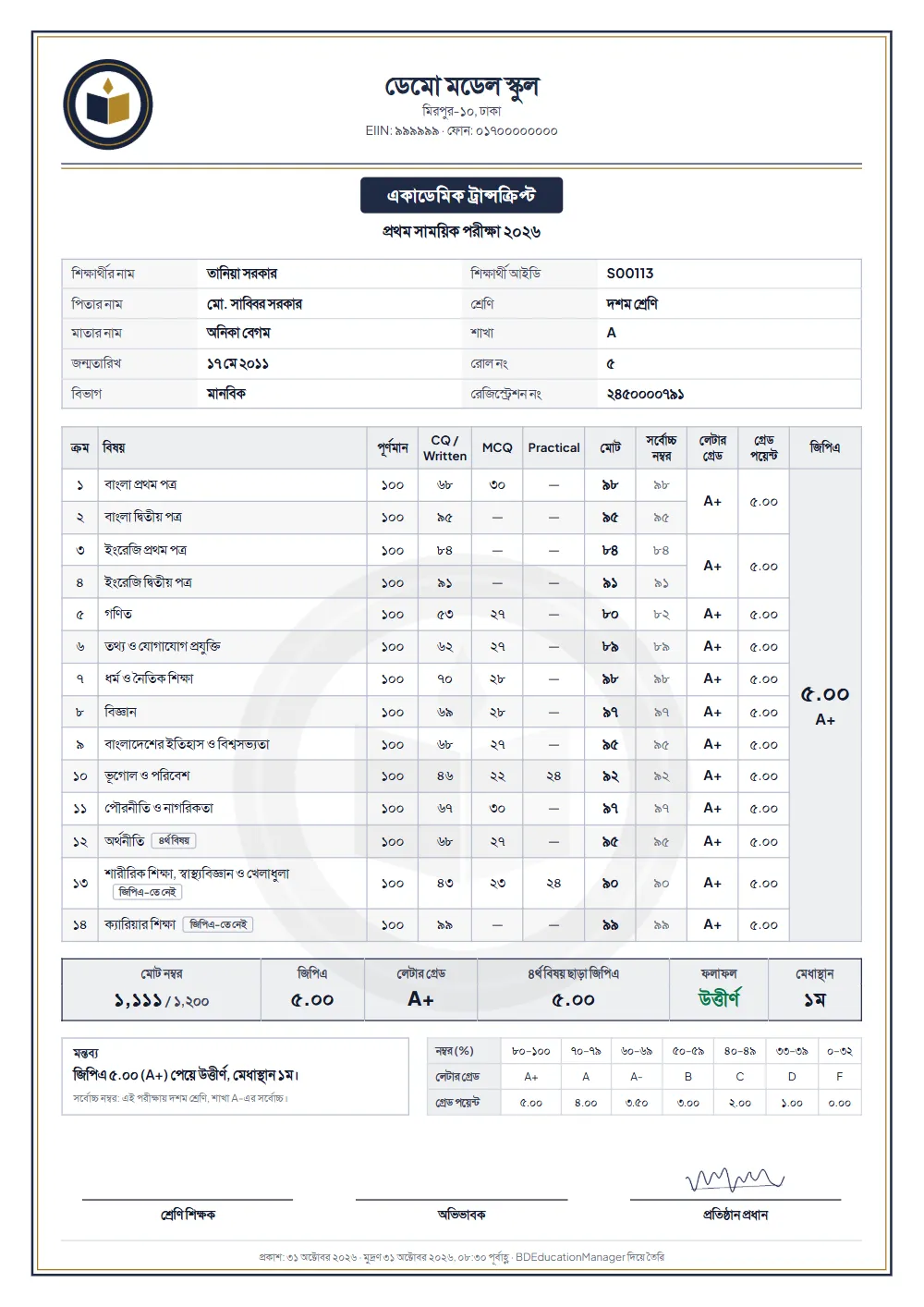
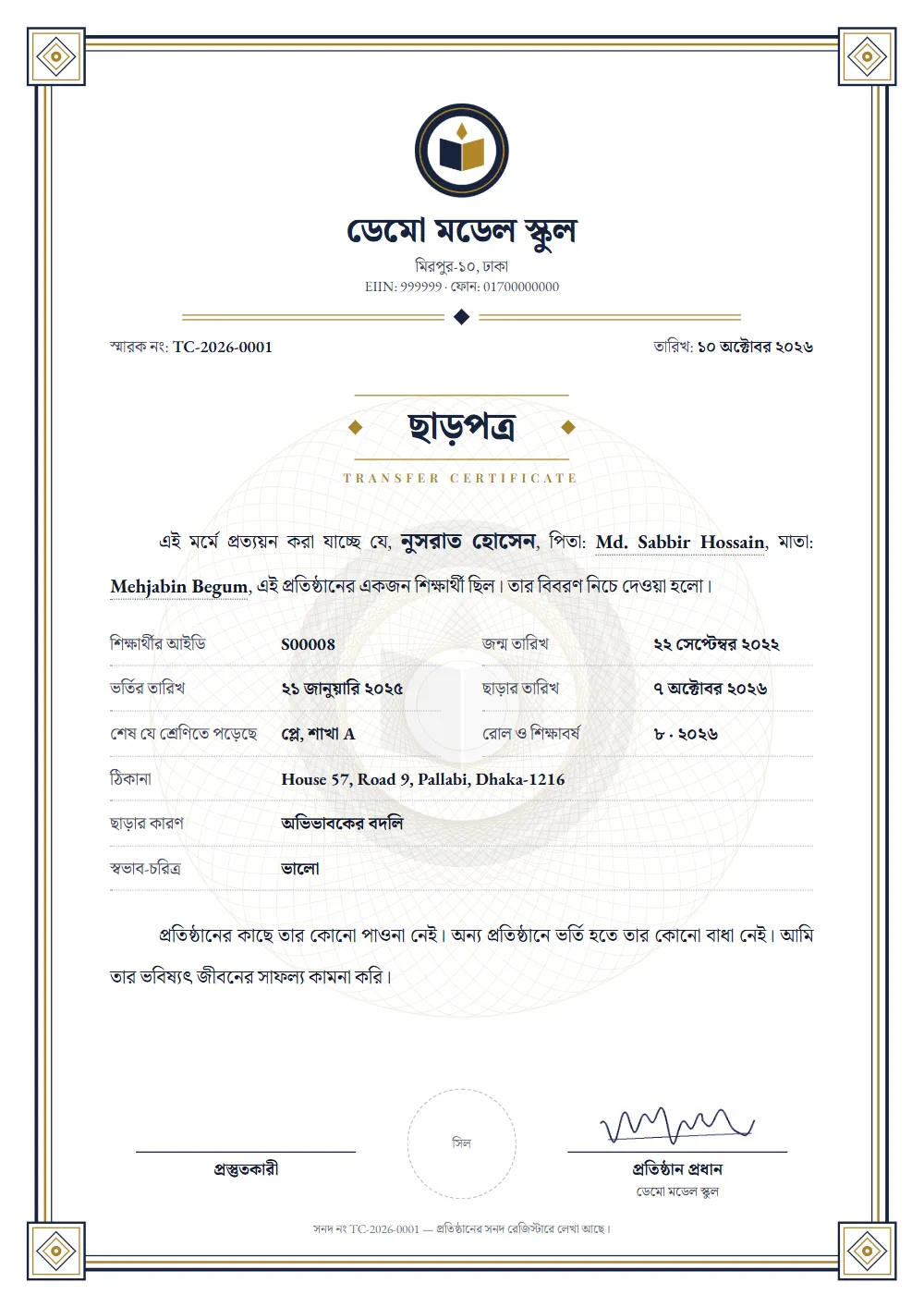
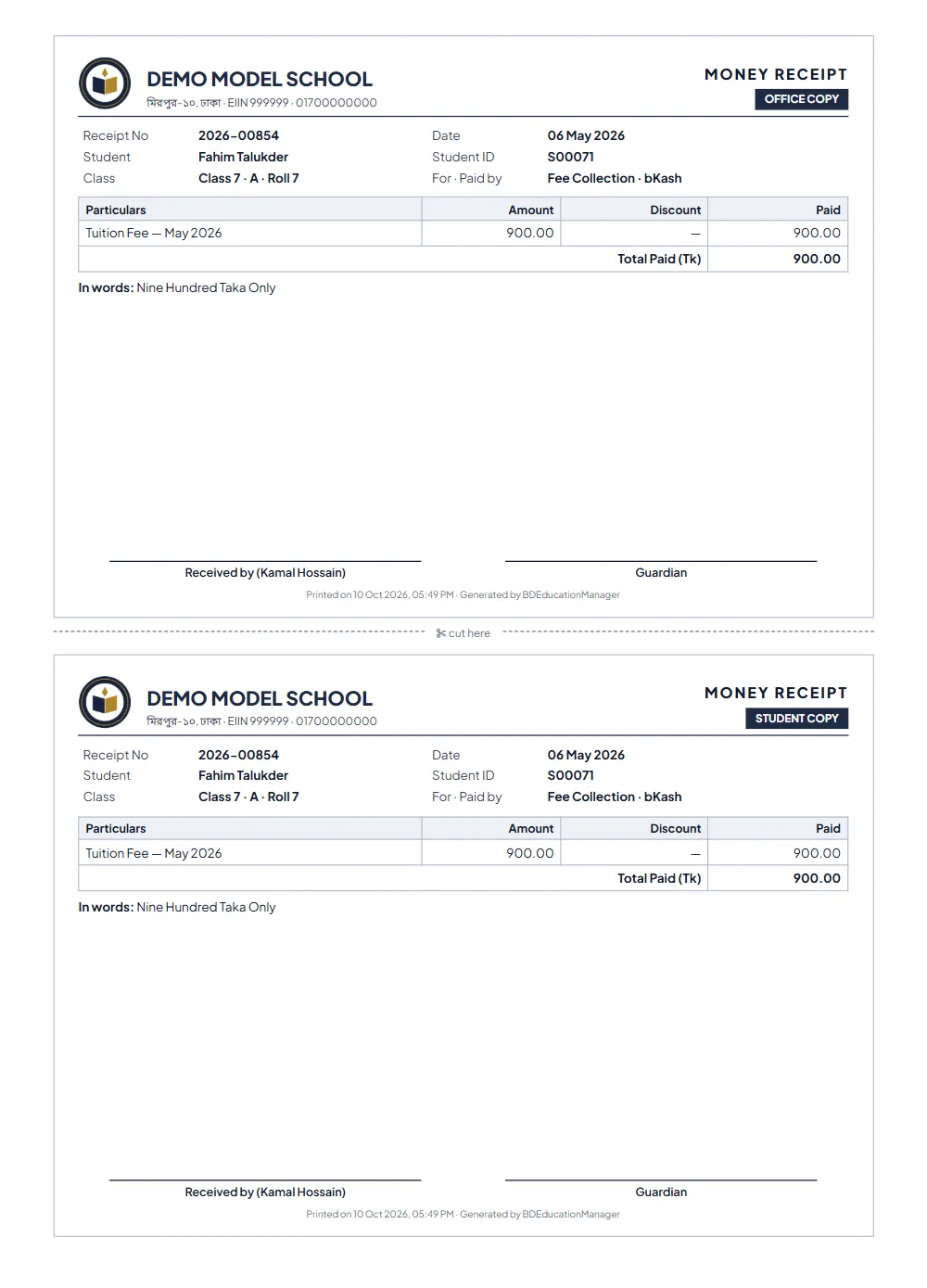
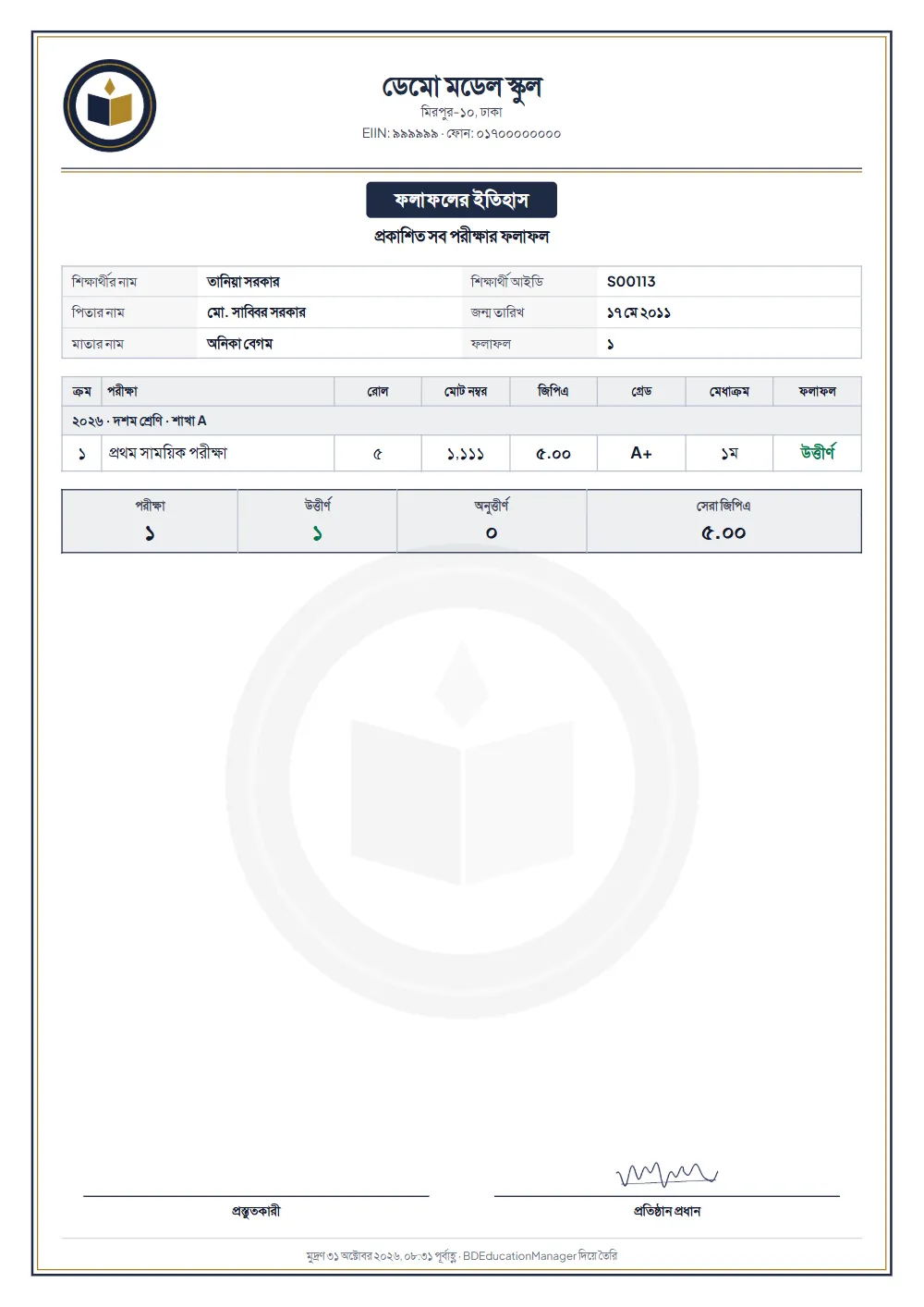
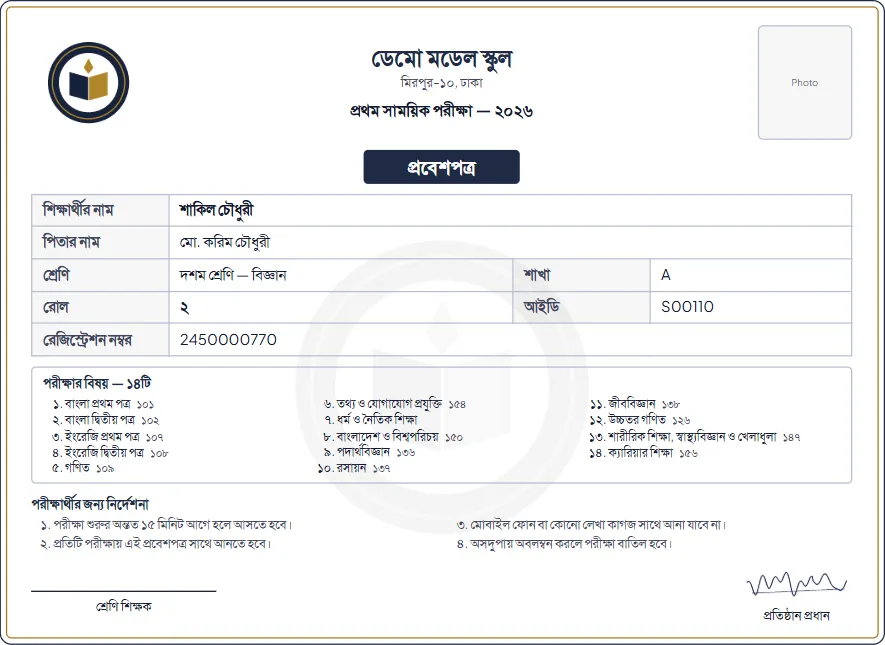
Printed, or saved as PDF — 16 kinds of paper
- Mark sheet (academic transcript) — a whole section at once, or one student
- Result history — all of a student's exams, every year
- Mark list of a subject — for a section, on A4
- Admit card — with every subject the student takes, two to an A4 sheet
- Student ID card — fourteen designs; one sample, the rest printed by us
- Admission form — every detail, the fees and the photo; office and student copies; a blank one too
- Rules for students — written your way, with room to sign
- Attestation certificate — with its own number
- Transfer certificate (TC) — with its own number
- Testimonial — with its own number
- Merit certificate — from the results in a click
- Money receipt — office and student copies
- Salary slip — office and employee copies
- Expense voucher — numbered
- Notice — on your letterhead, A4
- Class routine — by day, section or teacher
Reports and lists — 27 kinds
- Daily class report — who took which class and what was taught; as PDF
- Monthly teacher report — as PDF and in Excel
- A subject's class report — the whole year; with a teacher replaced, each one's part apart — as PDF
- Marks still missing — by section and subject, with the teacher; as PDF
- Results and merit — for every exam; by section or the whole class; as PDF
- Dues list — by student, month and class; as PDF and in Excel
- Receipts list — by date; as PDF and in Excel
- Income and expense report — by day, month or year — in charts; income or spending alone too, as PDF
- The ledger — all income and spending in one list: today, the last 2 or 3 days or any dates; by class, head and method; the columns you tick, as PDF
- The month's salaries — paid or still due; several months at once as PDF
- Student list — the columns you tick, filtered by kind; as PDF and in Excel
- Students by vehicle — who gets on where, how many km; a PDF to hand the driver
- The vehicles' month — bills, collected, dues and drivers' cost by route and vehicle; as PDF
- Residential students — By residence: room, class, advisors, mobile
- The residences' month — Bills, collected and dues by residence and head
- Study report — The advisors' notes, by date
- Night roll sheet — Each night of a month, student by student
- Going-out book — Who went when, why, and when they came back
- Student profile — each year's class, results and payments
- The day's attendance — present, late, absent, left early; as PDF by class
- A student's attendance history — by month and by year; a section's month as PDF
- Staff attendance — by fingerprint at the machine; by day, month and year as PDF and in Excel
- Staff leave — allowed, taken and left
- SMS history — what went to whom and when
- Certificate register — who got which, and when
- Activity log — who changed what and when
- Dashboard — collections, dues, students and results in charts
Dashboard
Your whole institution at a glance
Collections, dues, students and results — in charts on the dashboard, up to date every day on their own.
Collection by month
Boys and girls
- Boys 53%
- Girls 47%
Grades
Students by class
ID cards
Student ID cards — straight from the software
Choose a design, select a section and print — a whole section's cards together, at no extra charge.
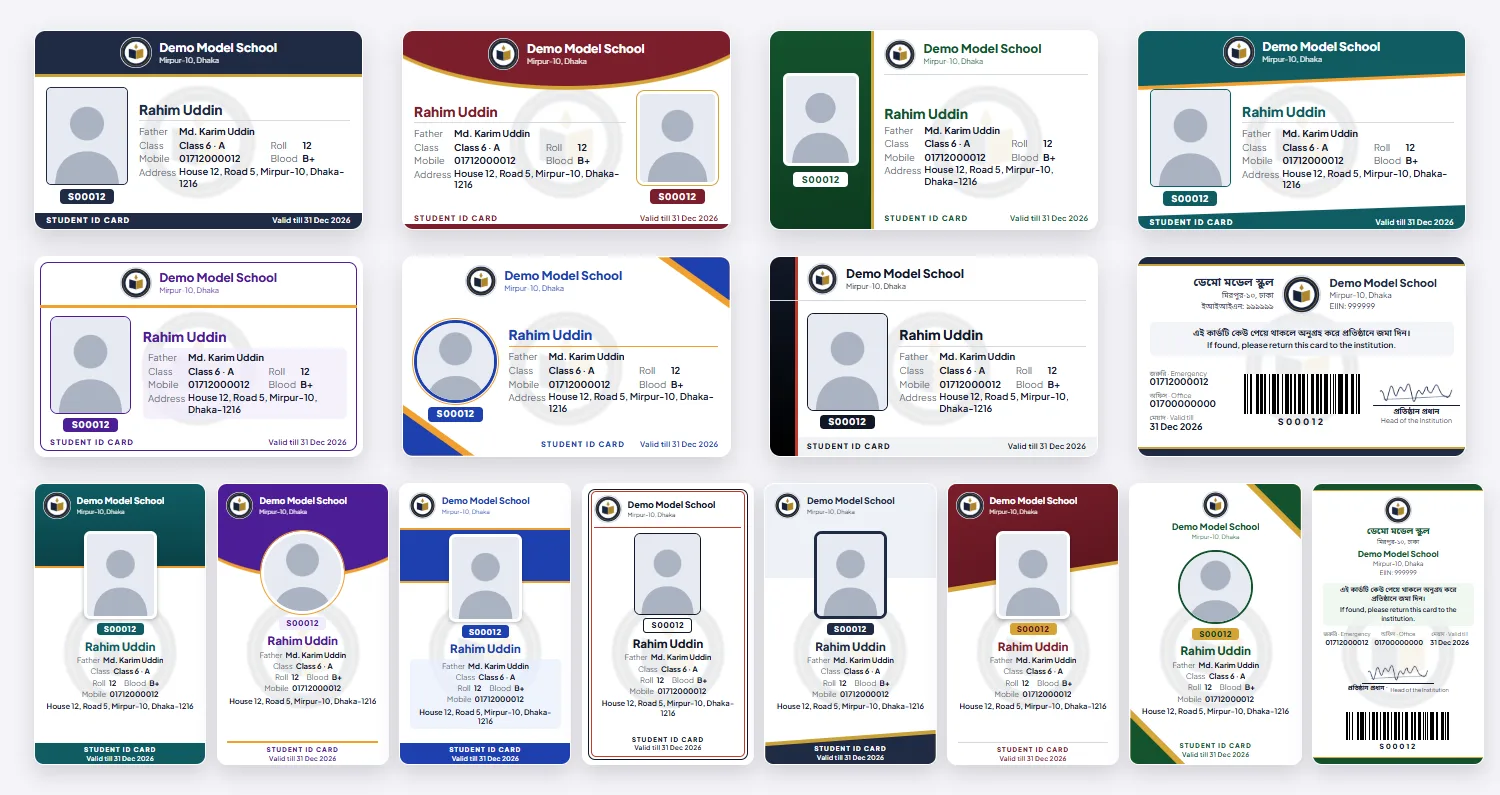
Fourteen designs, seven colours
Seven held wide, seven tall — with your institution's own name, logo and the colour you choose. Choose one and every card is in it.
Details on the front, a barcode on the back
Photo, name, father's name, class and section, the shift (if any), roll, blood group, mobile, address; on the back a barcode of the ID and the head's signature.
Printed by us
Download one sample card to see it; order the whole institution's cards — we print them on PVC.
Photos by Google Drive
Put the photos in a folder for each class and section, named by ID, and send the link; they are not kept on our server.
Nothing to type
It was all written at admission — it lands on the card by itself.
The lanyard in your own design too
Fourteen lanyard designs in seven colours — 2 cm × 36 in, with your institution's name and logo. See them with the card and up close, and choose.
The card's lanyard — with your name, logo and colour

Covers for the card
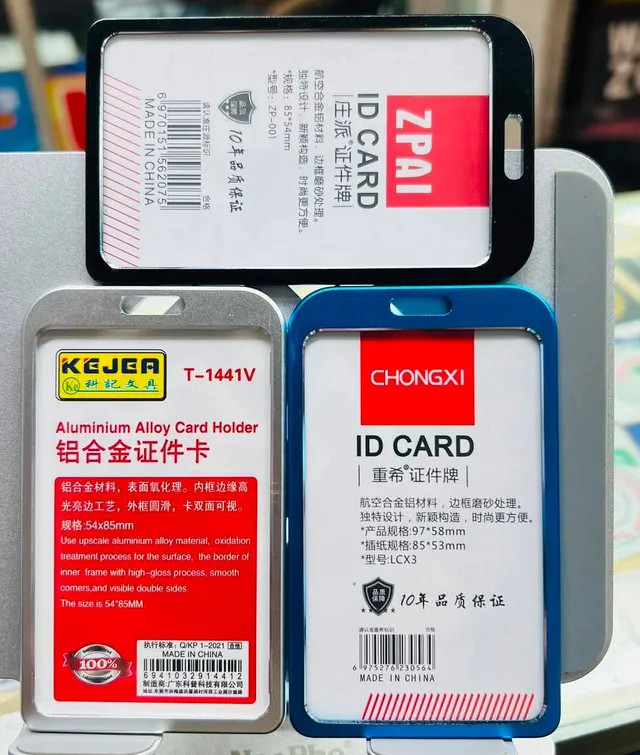

RFID cards, lanyards and covers can be had from us — send a request from “Order ID cards” in the software and we call you with the price and the date. An RFID card touched to the attendance machine takes attendance.
ID card and certificate softwareAttendance machines
Attendance devices — a card touched at the gate
New Attendance from a machine by students' cards is new — on the day your first machine is fitted we set it up with you. Teachers' and staff attendance is by fingerprint. Turned on, an SMS reaches the guardian as the child comes in, and a screen at the gate shows them with their photo. Device orders are taken — order and we will call you about the price, delivery and fitting.
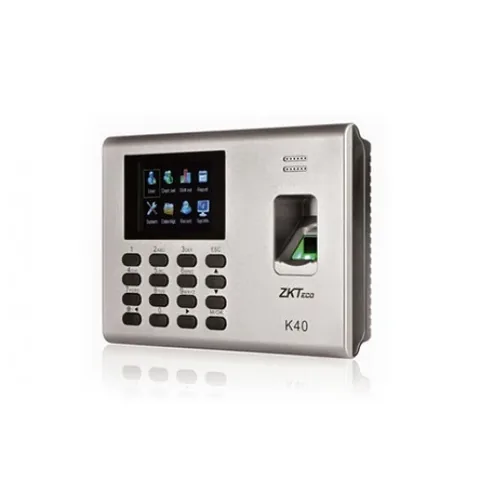
ZKTeco K40
- Up to 1,000 students — cards for students, fingerprints for teachers
- Holds 1,000 cards and 80,000 attendance records
- Sends attendance to the software by itself; keeps it and sends later when the internet is down
- Runs on a network cable (LAN); backup battery for power cuts
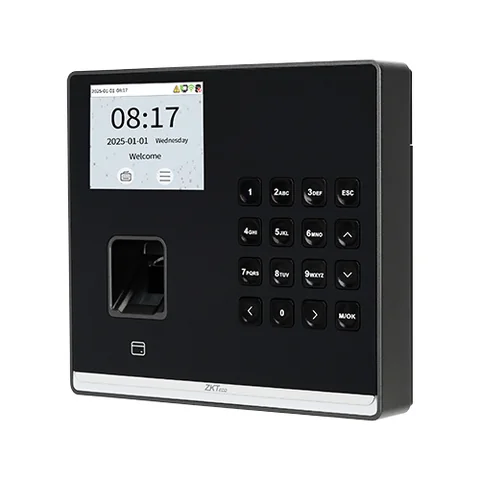
ZKTeco SenseFP M2
- Up to 3,000 students — cards for students, fingerprints for teachers
- Holds 3,000 cards and 150,000 attendance records
- Sends attendance to the software by itself; keeps it and sends later when the internet is down
- Runs on a network cable (LAN); Wi-Fi and a backup battery can be added
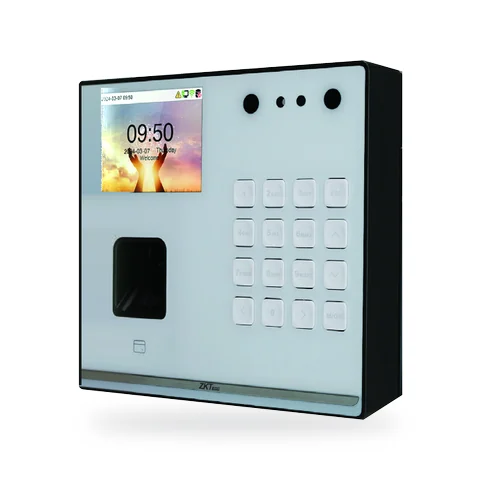
ZKTeco SenseFace M2F-LR
- Up to 1,000 people — cards for students; face or fingerprint for teachers and staff
- Holds 500 faces, 1,000 fingerprints, 1,000 cards and 150,000 attendance records
- Sends attendance to the software by itself; keeps it and sends later when the internet is down
- Runs on a network cable (LAN); Wi-Fi and a backup battery can be added
Price ৳13,500 — we bring it, fit it and set it up. Bought on your own: ৳1,000 to fit and set it up.
Up to 1,000 students a K40 is enough; above that, the SenseFP M2. For teachers and staff to sign in by face, the SenseFace M2F-LR. A large school can fit two or three devices to shorten the queue at the gate — the attendance from all of them comes together.
From the card tap to the guardian's phone
- 1
A card tap
A student taps their card on the machine at the gate.
- 2
Attendance, with the time
The device records it with the time and sends it to the software — keeping it to send later if the internet is down.
- 3
Into the software
Who came, who was late, who left early, who did not come — by class and section. On a screen at the gate, if you like, each punch shows large, with the photo and name.
- 4
An SMS to guardians
Turned on, an SMS reaches the guardian within a minute of the child coming in — for everyone, or the late only. Or pick from the late or absent list and send in one click.
- 5
The record stays
Each student's attendance summed by month and by year — from a click on the name.
Order a device
Leave your name and mobile number — we will call. Not sure which one? Choose "Not decided" and we will advise.
Who it is for
For schools, colleges, madrasas and coaching centres
Choose your type of institution and the classes, subjects, exams and grades are ready — start on day one and change anything later. Types run together too — kindergarten + high school, or high school + college — with every class in one account.
-
Kindergarten
Play and KG, up to Class 5 if you like
-
Primary school
Play to Class 5
-
Secondary school
Classes 6 to 10
-
School
Play to Class 10
-
School and college
Play to Class 12
-
College
Classes 11–12, and Classes 1 to 10 if you like
-
Madrasa
Ebtedayee, Dakhil and Alim
-
Coaching centre
Batches from Class 1 to 12
From a quick class test to board-exam practice — every exam in one place. Split each subject's marks your way — written, CQ, MCQ, practical — at any full marks. Set it up once and it runs every year, with past years' marks kept.
Weekly test
Under your own names, as many as you need
Monthly test
Every month, named after the month
Class test
Short tests subject by subject
1st term exam
In the first part of the year
2nd term exam
In the second part of the year
Half-yearly exam
Mid-year
Annual exam
At the end of the year, before promotion
Pre-test exam
Practice before the test exam
Test exam
Before SSC / HSC / Dakhil / Alim
Model test
Board exam practice — in schools and coaching centres alike
Your own (custom)
If none of these fits, any exam under the name you give it
The usual subjects are ready and added in one click — for Classes 9 to 12, those of all three groups: science, humanities and business studies. One grade for 1st and 2nd papers and the 4th subject — all by the board's rules, worked out for you.
Bangla (Play–12; 1st and 2nd papers from Class 6)
English (Play–12; 1st and 2nd papers from Class 6)
Mathematics (Play–10)
Drawing (Play, KG)
Bangladesh and Global Studies (Classes 3–10)
Primary Science (Classes 3–5)
Science (Classes 6–8)
Religion and Moral Education (Classes 3–10)
ICT (Classes 6–12)
Physics (Classes 9–12)
Chemistry (Classes 9–12)
Biology (Classes 9–12)
Higher Mathematics (Classes 9–12)
Accounting and the business studies subjects (Classes 9–12)
History, geography, civics, economics and the humanities subjects (Classes 9–12)
Quran Majid and Tajvid (madrasa, Classes 1–12)
Aqaid and Fiqh (madrasa, Classes 1–10)
Hadith Sharif (madrasa, Classes 6–12)
Arabic (madrasa, Classes 1–12; 1st and 2nd papers from Class 6)
Islamic History (madrasa, Classes 11–12)
Your own (custom) (any class)
Your subject not on the list? Add it under your own name — with your own full marks and parts.
How it works
How the software works
One institution, one account — from play group to college, every campus in one place. Everyone in their own login.
Roles and access
-
Admin, principal and headmaster
- Everything
- Setting what each role may do
-
Computer operator
- Admission and students
- Staff records
- Classes, subjects, routine
- Making and publishing results
- SMS
- Settings
-
Teacher
- Marks for their own subjects
- Updates for their own classes
- Viewing the routine, notices and the student list
-
Accountant
- Mark sheets
- Fee collection
- Setting fee amounts
- Salaries and expenses
- SMS
-
Staff
- Logging in to view the routine and notices
-
Access your way
Above are the starting rules. Give any role more or less in Settings; the admin always has everything.
What you set in Settings
- Name, address, EIIN, logo, the head's signature
- A short name for SMS
- Which section is on which campus
- Colour or black-and-white print, with a printer or without
- A new academic year, the current year
- Grades, cut-offs and points
- Merit within a section or the whole class
- Bills in advance or after the month, due day, late fee
- Automatic dues SMS: which days, to whom
- Balance, top-ups and every transaction
- What each role may do
- Your own language, font and text size
Paying for the software
- Keep money in your balance: send it by bKash or Nagad, give the transaction ID, added within 1 hour(s)
- The first bill 10 days after you register; the whole month if more than 10 days of it are left, else only ৳500
- Then taken from the balance on day 1 of each month
- A day's grace when the balance runs out, then view-only
- Signed up on 21 September: registration fee ৳2,000
- First bill on 1 October: the last 10 days of September ৳500 + October ৳1,000
- Then ৳1,000 on day 1 of each month
Result rules
- GPA = the average of subject points; an F in any subject fails
- 1st and 2nd papers make one grade
- 4th subject: points above 2 are added; failing it does no harm
- GPA-5 to start: A+ from 80, F below 33; change it if you like
- Merit: passed first, then total marks; equal totals share a place
- No mark means absent
Counting SMS
- English or Banglish: 160 characters make 1; longer, 1 per 153
- Bangla: 70 characters make 1; longer, 1 per 67
- One Bangla letter or emoji makes it count as Bangla
- The cost shows before sending; any that fail are refunded
Getting started
Start in 4 steps
- 1
Sign up
A few minutes with your institution's name and your details.
- 2
Registration fee
Send the fee by bKash or Nagad — it is confirmed within 1 hour(s) and everything opens.
- 3
Set up
Choose your type of institution — classes, subjects, exams and grades set themselves up.
- 4
Add students and teachers
Bring your existing list in from Excel at once, add your teachers and office — and you are running.
Your data, kept safe
Every institution apart. No institution can see another's data.
Everyone their own login. Passwords are kept so that no one can read them, not even us; you decide who may do what.
Every change recorded. Who changed what and when, before and after, stays in the activity log.
Money taken once. Even on a slow connection, a student's payment is never taken twice.
Backed up every night. Everything is backed up every night, over a secure connection (https) always.
Who we are
Who we are
“I built BDEducationManager so that any school, college, madrasa or coaching centre in Bangladesh can do all its work at little cost, in its own language, from a phone. For any question about your institution, talk to me directly.”
Md. Rafiul Islam
Founder and CEO, BDEducationManager · University teacher
- Main officeUttara, Dhaka
- Office 2Bhederganj, Shariatpur
- Office 3Kurigram
Questions about the school management software
What is BDEducationManager?
BDEducationManager is school management software for Bangladesh's schools, colleges, madrasas and coaching centres. Admission, attendance, fee collection, results and mark sheets, ID cards, salaries and SMS in one place; 77 features, none at an extra price. The price: ৳1,000 a month up to 500 students; beyond that, ৳2 a month for every student. It runs in a browser — on a computer or a phone, in Bangla or English. Anyone can open the demo with no login and try it.
Can every kind of fee be collected?
Yes. Admission fee, form fee, monthly fee, exam fee, session charge — and any fee under a name you give, for one class or all, once or every month. The month's bills are made by themselves; part or advance payments, discounts, waivers, late fees, a receipt for every payment and who owes what — all there.
Is there digital or automated attendance?
Yes, both. Digital: on a phone or a computer a whole section is marked present in a click, then those who did not come are unticked; late and left early are kept too, and a click on a name gives the month's and the year's sums. Automated: a student touches an RFID card at the gate and the machine sends the attendance by itself — this is new, and on the day your first machine is fitted we set it up with you. An SMS goes to the guardians of those absent when you send it — or, with the automatic SMS on, every day at the time you set, by itself.
Can teachers be monitored?
Yes. Each day: how many of the routine's classes each teacher took, what was taught, what homework was set — on one page, with the head's comment; and a report for each teacher at the month's end. Which subjects still have marks missing, and who has taken how much leave, show too.
How many kinds of reports and prints are there?
43 kinds. 16 kinds of paper are printed or saved as PDF — mark sheets, admit cards, ID cards, TCs, attestations, testimonials, money receipts, salary slips, vouchers, notices, routines. And 27 kinds of reports and lists — dues, income and expense, receipts, attendance, the teachers' daily and monthly reports, SMS history. The student list, the receipts list and the teachers' monthly report come as Excel too. Each is named on this page, with samples of a few.
Science, Humanities, Business Studies — can subjects run by group?
Yes, in classes 9 to 12. Every student has a group; each subject says what it is in each group — compulsory, only ever the optional (4th) subject, or taken either way. At admission or on edit the compulsory subjects come by themselves, one optional subject is chosen, and the software checks the list against the total. From then on mark entry, results, mark sheets and admit cards give each student their own subjects only. The three groups' SSC and HSC subjects come ready. For a college: 1st papers in Class 11, 2nd papers in Class 12, and the test exam grades the two together — which papers an exam has, and on how many marks, can be changed exam by exam.
Does it work without a computer?
Yes. The whole software runs in a phone's browser — marks, fees, SMS, everything. It can be put on the phone's home screen and opened like an app, with no Play Store. A computer and a printer in the office make printing receipts and mark sheets easier.
Do we have to type in all our existing students again?
No. A list kept in Excel comes in at once, and the software points out any mistakes before anything is saved.
Our marking system is different — will it work?
Yes. Each subject's marks are split your way — written, CQ, MCQ, practical or any name you give; full marks and pass marks are yours to set too. Change the rules later and earlier exams keep their marks.
Our subjects have different names — is that a problem?
Not at all. The usual subjects are ready, and you add your own under your own names — in Bangla and English. The mark sheet prints the names you give.
Our grading system is different — will it work?
Yes. It starts with the board's GPA-5; set your own grades, where each begins and its points, whenever you like.
Will it work for a madrasa or a coaching centre?
Yes. Choose the type and a madrasa's Ebtedayee to Alim, or a coaching centre's batches from Class 1 to 12, come with their subjects and exams; subjects such as Quran Majid, Arabic and Hadith Sharif are ready too.
Are result sheets and mark sheets made for us?
Yes. Enter the marks and GPA, pass or fail and merit place are worked out; each student's mark sheet, and every exam's result on one sheet, print or save as PDF.
Can we make ID cards, admit cards and certificates?
Yes. Student ID cards — fourteen designs in seven colours; with photo, father's name and address; a barcode of the ID on the back. Choose a design and see a sample — we print the whole institution's cards. Admit cards, attestation, TC, testimonial and merit certificates you print yourself; you set each one's fee — it shows at download; take it, or set it to zero, and print.
Can we see one day's income and spending?
Yes. In Accounts give today, the last 2 or 3 days or any dates; filter by class, head and method, and tick the columns you need. Which student paid how much to which head, who was paid how much — all in one list, as a PDF too.
Can guardians see results, attendance and dues on a phone?
Yes, if the school takes its own website (optional). With the student's ID and the password the school gave, they see results, dues, payments, attendance, the routine, admit cards, what was taught, notices and the vehicle. On an Android phone a QR code puts the school's icon on the home screen.
Does a new year mean setting everything up again?
No. Classes, sections, exams, marking templates, periods and settings stay for every year; subjects, teacher assignments, tuition and monthly fees come into the new year by themselves. A student's discount goes with their promotion. You choose whether to keep last year's routine or make a new one. Last year's one-time fees and holidays can be taken with a click; nothing is billed until you add it.
Can a teacher see the money?
No. A teacher enters marks for their own subjects and writes their own class updates; the routine, notices and student list are read-only. Fees, salaries, SMS and admission are not in their menu at all. A residence's advisor sees only their own students' dues, if the school says so, and can SMS their guardians. Settings changes what each role may do.
Can we keep the school's vehicles and their fees?
Yes. Add the vehicles, routes and drivers; the price goes by route, class or km, as you decide. An agreement at admission goes in as a discount, in per cent or taka. The fee is billed by itself each month; stop a month for anyone who does not use it, and it goes on by itself the month after. The drivers' cost is kept by name too. Without vehicles, none of this shows.
Can we run residences or a hostel?
Yes. Add the residences and your heads; the price goes by residence or by class, as you decide. A student can be given a residence at admission, and each head is billed by itself each month. Advisors, the night's roll and the going-out book are there too; nothing shows until it is turned on in Settings.
Are guardians told as soon as the child comes in?
Yes, once turned on. An SMS goes within a minute of the punch or the teacher's mark — for everyone or the late only, on going out too if you like. Each SMS is paid from your balance.
Do the papers come in Bangla?
Yes. Mark sheets, receipts, admit cards, admission forms, notices and every report — choose Bangla or English as you print. A Bangla copy has names and addresses in Bangla, and the amount in words too.
What does SMS cost?
৳0.42 an SMS — you pay only for what you send. Keep money in your balance by bKash or Nagad, and see the total cost before you send.
What is the monthly bill — and with more students?
৳1,000 a month for up to 500 students, however few; over that, ৳2 a month for every student — for example ৳1,000 for 500, ৳2,000 for 1,000, ৳3,000 for 1,500, ৳4,000 for 2,000. Every service at this price, for any number of users.
Are there any hidden costs?
No. Every cost is on this page: the monthly bill, a registration fee once at the start, and the SMS you send. No feature, extra user or support costs more. Only an attendance machine or printed cards, if you take them, are priced apart.
Will it slow down with many students?
No. We measure it with the records of 21,000 students: for an institution of 500, the server takes about a tenth of a second to make a page. It is measured again after every piece of new work.
When and how is the monthly bill paid?
The first bill comes 10 days after you sign up. With more than 10 days left in the month you signed up in, that month is billed whole; with 10 days or fewer, only ৳500. After that it is taken from your balance at the start of each month; just keep money there by bKash or Nagad.
What does it take to start, and how long?
Send the registration fee by bKash or Nagad and give the transaction ID when you sign up — it is confirmed within 1 hour(s). Then choose your type of institution and the classes, subjects and exams are ready; you can start the same day.
Does it work in Bangla or English?
Both. Everyone uses it in Bangla or English as they like. Receipts and mark sheets print in English.
Could a slow connection record a student's payment twice?
No. Even if the same payment for a student arrives twice, the software takes it once and shows the first receipt. The same goes for sending SMS.
Can students or guardians log in?
Yes — when the school takes its own website. There, a student or guardian logs in with the student's ID and the password the school gives, and sees results, payments, dues and certificates. Every other login is for the institution's admin, teachers and office; guardians get results, dues and notices by SMS too.
Do you give a school its own website?
Yes. Your school's public pages and a student and guardian panel on your own domain, filled from the software — YourSchoolName.xyz for ৳400 a year, YourSchoolName.com for ৳2,200 a year. Open the demo school's website: bdeducationmanager.com/demo-school. It is optional: without it, the whole software runs from bdeducationmanager.com as now.
We have morning and day shifts — will it work?
Yes. In Settings give each shift its name, start, from when it is late, and closing time; put each section in its shift. Students' late and early are worked out by the shift's times, staff can be in one shift, several or all, and the shift is printed on the ID card.
We have several campuses. Will it work?
Yes. All of an institution's levels and campuses are in one account, and you set which section belongs to which campus. Separate institutions each have their own account and logins.
Can we keep a copy of our data?
Yes. Student lists, receipts and lesson logs download to Excel; mark sheets and receipts to PDF. Everything is backed up on the server every night.
How safe is our data?
Each institution's data is kept apart; no one else can see it. Everyone has their own login, you decide who may see or change what, and every change is recorded with who made it.
Is school management software the same as a school ERP or an EIMS?
Yes — different names for one thing. Some say school management software or school management system, others school ERP, education institute management software (EIMS), school automation or student management software. They all mean admission, attendance, fees, results and SMS in one place. BDEducationManager is that software, for schools, colleges, madrasas and coaching centres.
Will we get help if something goes wrong?
Yes. Write to us from inside the software and the answer comes there; for anything urgent, call 01765-300869. Support costs nothing extra.
Start your institution today
Sign up in minutes and start today. Want to see it first, or have a question? Call or write — we will show you.